
Key Takeaways
A structured custom app planning checklist helps business owners define real problems, prioritise features, and arrive at development kickoff with clarity and confidence.
- Define the root cause of your business problem before listing features; treating symptoms without solving the underlying issue leads to a product that falls short of real needs.
- Separate must have features from nice to haves by asking which capabilities are required on day one to solve the core problem, and defer everything else to a later phase.
- Know your users specifically before any screen is designed; their technical confidence, devices, and working conditions shape adoption rates and determine whether your team embraces the product.
- Prepare a written problem statement, prioritised feature list, workflow documentation, brand assets, and integration credentials before your development kickoff to prevent costly back and forth delays.
- If your app requires multiple system integrations, sensitive data handling, or role based permissions, bring in a development partner during the planning phase so their expertise shapes your decisions from the start.
Before a single line of code is written, the decisions you make about your custom app will determine whether the final product solves your real business problems or simply adds another tool to an already cluttered workflow. A structured planning checklist gives you a clear path from vague idea to a well-defined brief that a development team can actually act on. For business owners in Vancouver, from Gastown startups and Yaletown studios to growing operations in Burnaby and Surrey, who are outgrowing their current systems, this kind of upfront discipline is often the difference between a smooth build and a costly rebuild. Teams that invest in this preparation consistently see faster delivery, fewer surprises, and better outcomes because the thinking happened before the building.
This guide walks you through each stage of that planning process so you arrive at your development kickoff with clarity, confidence, and a project that is genuinely ready to build.
Table of Contents
Why Planning Before You Build Saves You More Than Money
Every decision made before development begins carries far more weight than decisions made once coding is underway. Changing direction mid-project, whether that means rethinking a core feature, restructuring a user flow, or adjusting integrations, costs considerably more in time and budget than addressing those same issues during planning.
Business owners who skip structured planning often discover halfway through a build that their requirements were incomplete. Scope starts shifting in ways that erode both the timeline and the budget. This is not a rare edge case. It is one of the most common reasons software projects run over cost and under-deliver.
Research from Nielsen Norman Group consistently highlights that even basic discovery methods yield significantly lower returns when executed without proper preparation. That principle applies directly to app development. Preparation is not overhead; it is the investment that makes everything downstream more efficient, more accurate, and more valuable. At Twelfth Dream, our six-step Agile process begins with a dedicated discovery and planning phase precisely because that foundation shapes everything that follows.
Step 1: Define the Real Problem
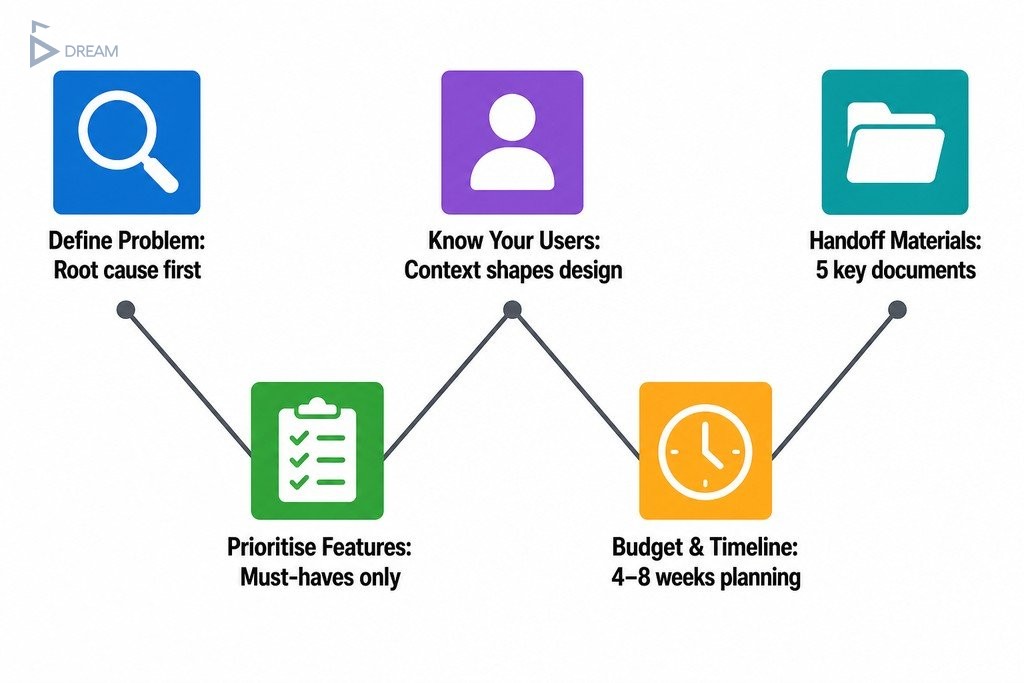
The first and most important step is separating the symptoms of a business problem from the problem itself. Slow workflows, disconnected spreadsheets, manual errors, and hours of duplicated effort are symptoms. The root cause might be an absence of centralised data, a lack of automated handoffs between teams, or a process designed for a five-person company now trying to serve fifty.
Jumping straight to features without identifying the root cause results in a product that treats symptoms without resolving the underlying issue.
Start by documenting the specific pain points that triggered the need for a custom solution. Write them in plain language, not technical language. Note which team members are affected, how often the problem occurs, and what it costs in time, errors, or missed opportunities. This documentation becomes the foundation of your entire planning process and gives any development partner the context they need to recommend the right approach from day one.
How to Write a Clear App Purpose Statement
Once you have identified the root problem, distil it into a single, clear purpose statement. This is one paragraph that explains who is affected, what they are trying to accomplish, what currently prevents them from doing it, and what a successful outcome looks like.
This statement should be specific enough to guide every future decision about the product. If a proposed feature does not connect back to it, it does not belong in the first version. Think of it as your project’s north star. It keeps scope tight, conversations productive, and the development team aligned with your actual business goals.
Step 2: Map Must-Have Features vs. Nice-to-Haves
One of the most practical steps in any app planning checklist is creating an honest, prioritised feature list. The instinct when planning a new product is to capture every useful thing the app could eventually do. While that instinct is understandable, it is one of the primary causes of blown budgets and delayed launches.
Prioritisation means asking a harder question: which features are required to solve the core problem on day one, and which ones would simply be useful later? Only the first category belongs in version one.
For each feature you are considering, ask whether it directly addresses the problem in your purpose statement, whether users would abandon the product without it, and whether it could be added in a later phase without disrupting the core experience. Building essential functionality first delivers faster value, reduces waste, and generates real user feedback before you commit more budget to additional features. This principle is central to how Twelfth Dream approaches every project.
| Feature Category | Definition | When to Build | Example |
|---|---|---|---|
| Must-Have | Required to solve the core problem from day one | Version 1 | User login, core workflow automation |
| Nice-to-Have | Adds value but the product works without it at launch | Later phase | Advanced reporting, third-party integrations |
How to Prevent Scope Creep Before It Starts
Scope creep rarely announces itself. It tends to arrive quietly, one reasonable request at a time, until the project has grown far beyond what the original budget and timeline can support.
The most effective protection is a phased roadmap agreed upon before development begins. A phased roadmap defines what will be built in each release, what will be deferred, and what criteria will trigger a new phase. This creates a formal decision point before any new scope is added, protecting your launch date and your budget.

Step 3: Understand Your Users Before Any Screen Is Designed
Custom app development for business only works when the product is built for the people who will actually use it every day, not for an imagined ideal user. Before any screen is designed, you need a clear picture of who your users are: how technically confident they are, what devices they will use and under what conditions, and how frequently they will interact with the app.
A warehouse team lead checking inventory on a mobile device in a busy distribution facility has completely different needs than an office-based finance manager reviewing monthly reports on a desktop. These are not the same design problem, and treating them as one leads to a product that works adequately for nobody.
User context shapes adoption in ways that generalised assumptions cannot capture. Defining your user groups early, including non-technical internal staff who may resist new tools, tends to result in higher adoption rates and fewer post-launch revisions. User-first thinking at the planning stage is not a luxury. It is what makes the difference between a product your team embraces and one they work around.
Step 4: Set a Realistic Budget and Timeline
App development timeline planning is one of the areas where business owners most consistently underestimate what is involved.
Thorough planning, including problem definition, user research, feature prioritisation, and specification writing, typically spans four to eight weeks before a development team writes a single line of code. That planning period is not a delay. It is the work that prevents much costlier delays later in the project.
When establishing your budget, the primary cost drivers are the scope of features required at launch, the complexity of integrations with your existing tools, and the level of ongoing support needed after launch. A structured delivery framework with milestone-based releases, like the one Twelfth Dream uses, keeps costs visible and predictable at every stage. You review and approve each phase before it begins, so you are never faced with a large, unexpected bill at the end of a project.
Questions to Ask a Vancouver App Developer Before You Sign
Before committing to a development partner, ask questions that reveal how they actually work, not just what they claim to deliver:
- How do you handle changes to scope once development has started, and what is the approval process for new features?
- What does your milestone and delivery structure look like, and how often will I see working progress?
- Who on your team will I be communicating with directly throughout the project?
- What does your post-launch support arrangement include?
- Can you walk me through a previous project where requirements changed mid-build and explain how you managed it?

Step 5: Prepare Your Handoff Materials
Thorough preparation before your development kickoff prevents the back-and-forth that slows projects down in their earliest and most critical weeks. The more organised your handoff materials are, the faster your development team can move without stopping to wait for information.
Before your kickoff, gather the following:
- Your written problem statement and prioritised feature list
- Existing workflow documentation or process maps describing how your business currently operates
- Brand assets including logos, colour palettes, and style guidelines
- Login credentials or API documentation for any third-party tools the app will need to connect with
- Examples of other products whose design or user experience you admire
| Handoff Material | What It Includes | Why It Matters |
|---|---|---|
| Problem statement | Written summary of the root problem, who is affected, and what success looks like | Aligns the development team with your business goals from day one |
| Prioritised feature list | Must-have and nice-to-have features separated by phase | Prevents scope creep and keeps the first release focused |
| Workflow documentation | Process maps or descriptions of how your business currently operates | Helps developers understand context and avoid design assumptions |
| Brand assets | Logos, colour palettes, and style guidelines | Ensures the product reflects your brand without revision cycles |
| Integration credentials or API docs | Login details or technical documentation for connected tools | Allows developers to assess integration complexity accurately |
| Design references | Examples of products whose UX or visual style you admire | Gives designers a shared reference point for tone and direction |
Having these materials ready is a core part of how to write app requirements in a way that gives developers everything they need to begin without unnecessary delays. A few hours of preparation typically saves days of back-and-forth during the early stages of a project.
When Vancouver Business Owners Need More Than a Checklist
A self-guided planning checklist is a powerful starting point, but there are clear signals that your project has grown complex enough to warrant bringing in a development partner earlier than you might expect.
If your app needs to integrate with multiple existing systems, handle sensitive data, serve users across different roles with different permissions, or scale significantly within the first year, those are not planning problems you should try to solve alone. Attempting to specify technical architecture, data structure, or integration logic without software expertise leads to assumptions that can become expensive corrections during the build.
The app testing and launch checklist, the detailed requirements specification, and the technical feasibility assessment are all areas where an experienced development partner adds genuine value before a single feature is designed. Bringing that partner in during the planning phase, rather than after it, means their expertise shapes your decisions and not just your execution.
At Twelfth Dream, we regularly work with business owners across Vancouver and the Lower Mainland at the very beginning of their planning process, helping them turn a general vision into a well-scoped brief that is ready to build efficiently, on time, and on budget. If your systems are starting to hold your business back and you are ready to move forward, we would be glad to be part of that conversation from day one.
Frequently Asked Questions About Custom App Planning
How long does the planning phase for a custom app typically take?
For most business applications, thorough planning takes four to eight weeks. This covers problem definition, user research, feature prioritisation, and writing a requirements specification. Rushing this phase is one of the most common causes of budget overruns and scope creep later in the project.
What is the difference between must-have features and nice-to-have features?
Must-have features are those without which the app cannot solve the core problem identified in your purpose statement. Nice-to-have features add value but can be deferred to a later phase. Drawing this line clearly before development begins keeps your launch timeline realistic and your first release focused.
Do I need to have technical knowledge before speaking to an app developer?
No technical background is required. What matters most is a clear understanding of the business problem you are trying to solve and who needs to solve it. A good development partner will translate your operational requirements into technical specifications. Your job is to describe the problem accurately, not to prescribe the solution.
How do I prevent scope creep once development has started?
The most effective approach is agreeing on a phased roadmap before development begins. This formally defines what is built in each release and creates a structured approval process for any new requests. Without this, even small additions accumulate quickly and can stretch both timelines and budgets beyond what was originally planned.
What handoff materials should I prepare before my first meeting with a developer?
Bring a written problem statement, a prioritised feature list, workflow documentation, brand assets, and access details or API documentation for any tools the app needs to connect with. Having these ready allows the development team to assess scope accurately and begin work without unnecessary delays.
When should a Vancouver business owner bring in a development partner versus planning independently?
Independent planning works well for straightforward internal tools with a small user base. Once your app requires complex integrations, role-based permissions, sensitive data handling, or significant first-year scaling, involving a development partner during planning rather than just execution helps ensure the technical architecture is sound from the start.