The moment a client logs into your portal for the first time, they are forming an opinion about your business. Not about your service, not about your team — about you. A clean, intuitive experience signals competence and care. A confusing, slow, or feature-thin portal signals the opposite, and that impression is difficult to undo. For growing businesses across Canada, understanding what clients expect from a portal is no longer optional — it is the baseline standard clients arrive with before the conversation even begins.
According to Salesforce, 82% of service professionals agree that customer expectations are higher than they used to be. That trend shows no signs of reversing. The businesses that consistently meet these expectations are the ones that retain clients, reduce operational friction, and scale without breaking. This article walks through exactly what those expectations look like — and how to build a portal that satisfies them from day one.
Table of Contents
Why Client Portal Features Define the Ongoing Relationship
For most service businesses, the portal is not a supplementary tool — it is the primary relationship channel. Long after the sales conversation ends and the onboarding call wraps up, the portal is where clients return every time they need something. It is where they check progress, submit requests, download documents, and decide, quietly and privately, whether working with your team is still worth it.
A portal that frustrates clients creates support tickets. One that confuses them creates phone calls. One that earns their confidence creates loyalty. When a client cannot find what they need, they do not wait patiently — they escalate, disengage, or eventually leave. Getting the features right is not just a user experience decision. It is a retention and revenue decision that compounds over time.

The Baseline Features Clients Take for Granted
Before exploring advanced capabilities, it is worth grounding the conversation in the features clients consider non-negotiable. These are not differentiators — they are prerequisites. Research from Microsoft found that 90% of customers globally expect brands to offer an online self-service portal, and 77% have already used one. Your clients are not discovering self-service for the first time; they are comparing your portal to every other one they have used.
Clients want to feel informed and in control from the moment they log in. Any portal that falls short of these fundamentals will generate friction regardless of how sophisticated its secondary features are. Think of them as the foundation upon which everything else is built.
Secure Login and Role-Based Access
Clients do not want to see everything — they want to see exactly what is relevant to them, and nothing more. A secure login paired with role-based access control tells clients that your business handles information with discipline. When a client logs in and sees only their own projects, files, and invoices, that experience reinforces professionalism without requiring any explanation. It is the digital equivalent of a well-organised client file handed across a desk.
A portal where users can accidentally access another client’s data, or where permissions are poorly segmented, creates immediate trust damage that is difficult to recover from.
Real-Time Status and Activity Visibility
One of the most common pain points for service business clients is simply not knowing where things stand. They send an email, hear nothing for a day, and send a follow-up. This cycle wastes time on both sides and quietly erodes confidence.
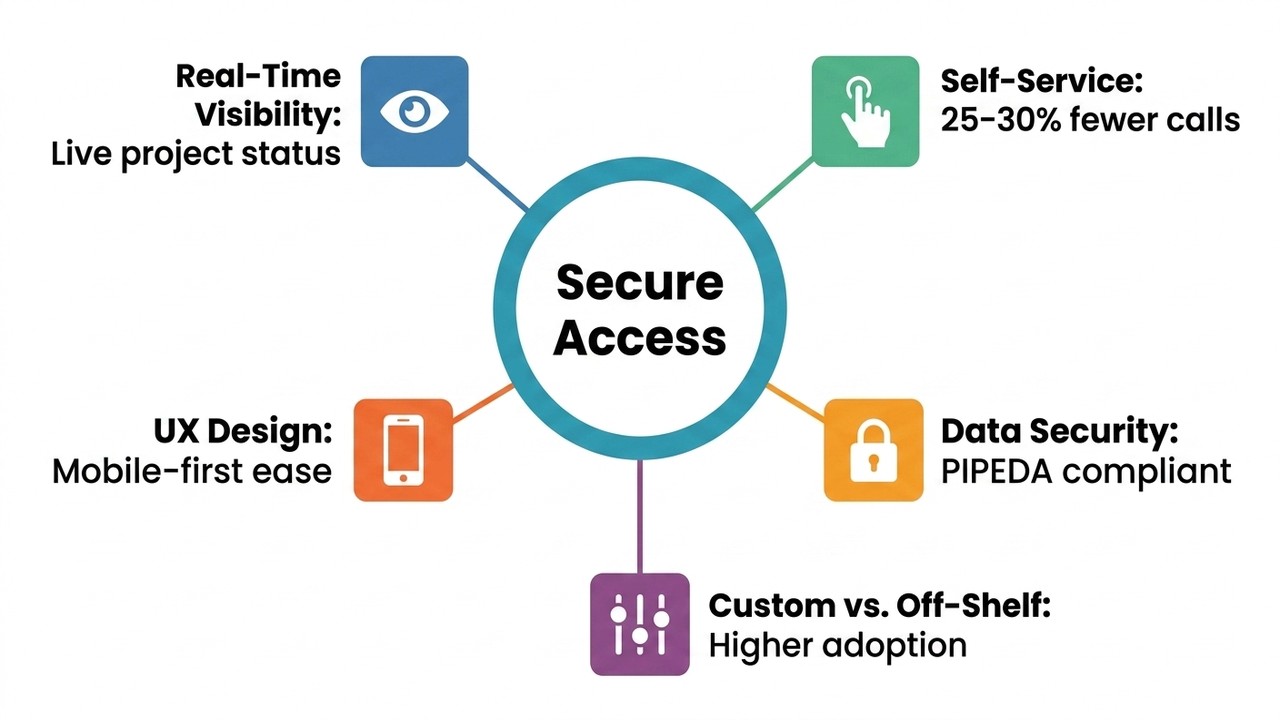
A thoughtfully designed dashboard resolves this by surfacing real-time project status, recent activity and completed milestones, and upcoming deliverables with clear next steps. When clients can see that a document was reviewed or an invoice is ready for download — all without asking — they feel connected to the work even when no conversation is happening. That visibility alone significantly reduces unnecessary follow-up emails.
Self-Service Features That Reduce Daily Friction
Self-service capabilities represent the operational core of any effective client portal. The ability to upload documents, access invoices, book appointments, and submit requests without involving a team member is not a convenience — it is an expectation. Forrester research indicates that 70% of customers expect a self-service application on a company’s website, and that self-service portals can reduce support call volumes by roughly 25 to 30%.
When those capabilities are absent, routine interactions pile up in inboxes and slow your team’s ability to focus on higher-value work. For a growing business managing a dozen or more active client relationships simultaneously, that recovery is significant.
Self-service is not about removing the human element — it is about reserving human attention for the moments that genuinely require it. Most clients prefer handling simple tasks on their own and save direct contact for issues that truly need a conversation.
User Experience Principles That Keep Clients Coming Back
A portal can have every feature on a checklist and still fail if clients find it uncomfortable to use. The underlying question is simple: can a busy person with varying technical comfort find what they need in under a minute? If the answer is no, the feature set does not matter. Clients will avoid the portal and default to email, which defeats the purpose entirely.
Three UX principles consistently separate portals clients use habitually from those they work around:
- Mobile responsiveness — A significant share of users check portal updates from a phone or tablet. This is now a baseline expectation, not a bonus feature.
- Logical navigation — Consistent layout and clear labels reduce the cognitive load required to complete even simple tasks.
- Intuitive flow over visual complexity — Prioritising ease of use ensures clients across a wide range of technical backgrounds feel confident, not lost.
When a portal feels effortless to use, clients return to it habitually rather than treating it as an obstacle.
How Security Features Build Long-Term Client Confidence
Security is one of those areas where clients rarely think about it — until something goes wrong, and then it is all they think about. Secure portal features including data encryption, audit logs, granular permission controls, and alignment with Canadian data handling standards are not just technical requirements. They are signals that your business takes client information seriously.
Audit logs serve a dual purpose: they protect the business from disputes while giving clients a verifiable record of every action taken within their account. When a client asks how their data is protected and the answer is clear, documented, and accessible inside the portal itself, that response builds a different level of trust than a vague verbal reassurance.
For Canadian businesses operating under PIPEDA and applicable provincial privacy legislation, demonstrating compliance through the portal’s own design — not just through policy documents — is both a legal consideration and a competitive signal worth communicating clearly to clients from coast to coast.

Custom Portal vs. Off-the-Shelf: Understanding the Real Difference
Generic portal platforms promise broad functionality, but that breadth comes at a cost. When your workflow does not match the assumptions built into a SaaS product, the result is a portal that technically works but practically frustrates — both your team and your clients. Custom CRM and client portal ideas exist precisely because growing businesses rarely operate the way a software vendor’s template had in mind. Off-the-shelf tools require teams to adapt their processes to the software, rather than the software adapting to the team.
A custom-built portal is designed around your specific client journey. Only the features that matter to your clients and your workflow are included, which reduces cognitive clutter and increases adoption. Custom CRM features for growing teams, when built intentionally, remove the ceiling that generic platforms impose — no workarounds, no unnecessary modules, no licensing tiers standing between your clients and the experience they deserve.
The investment tends to pay for itself through reduced support overhead, higher client retention, and a system that scales as the business scales — without requiring a platform migration every few years.
| Factor | Custom-Built Portal | Off-the-Shelf Platform |
|---|---|---|
| Workflow fit | Designed around your specific processes | Requires teams to adapt to the software |
| Feature set | Only what your clients and team need | Broad but often includes unnecessary modules |
| Client adoption | Higher — fewer workarounds needed | Varies — can frustrate if workflow misaligns |
| Scalability | Scales with the business without platform migration | May require migration as needs outgrow limits |
| Cognitive clutter | Low — tailored to the client journey | Medium to high — broad feature sets add noise |
| Best suited for | Businesses with specific or evolving workflows | Early-stage or standardised operations |
What to Clarify Before Building or Upgrading a Client Portal
Before committing to a portal build or significant upgrade, answering a few foundational questions will shape the feature priority list more accurately than any checklist — because they are grounded in your actual client experience rather than a vendor’s assumptions about it:
- Which client interactions currently generate the most friction — the most emails, the most repeated questions, the most delays?
- What information do clients most frequently ask for, and how quickly can they access it today?
- Which workflows, if automated, would recover the most time for your team each week?
It is also important to treat a portal as a living product rather than a one-time delivery. Salesforce projects that the share of customer service cases resolved through AI and self-service will continue to grow through 2027, with self-service identified as a leading use case. That trajectory means client expectations will continue to evolve, and a portal built with adaptability in mind will remain relevant as they do.
Phased delivery — launching with the highest-impact features first and refining based on real client behaviour — is almost always more effective than attempting to build everything at once. A well-scoped first release that clients use consistently is worth more than a comprehensive portal that overwhelms them on day one.
If your team is navigating disconnected systems, fielding routine questions that a portal should be answering automatically, or simply ready to give clients the experience they deserve, Twelfth Dream is ready to help you build it. From the first conversation through launch and beyond, the team at Twelfth Dream handles every layer of complexity so you can focus on the relationship — not the roadmap. Reach out to start the conversation about what your ideal client portal could look like.

Frequently Asked Questions About Client Portal Features
What are the most important client portal features for a service business?
The most critical features are secure login with role-based access, real-time project status visibility, document sharing, invoice access, and self-service request submission. These address the interactions clients have most frequently and reduce the volume of routine emails and calls your team needs to handle.
| Feature | Client Need It Addresses | Team Benefit |
|---|---|---|
| Secure login with role-based access | Confidence that only relevant information is visible | Reduces data exposure risk and trust damage |
| Real-time project status visibility | Knowing where things stand without asking | Fewer status update emails and calls |
| Document sharing and upload | Easy access to files without chasing team members | Centralised records, less back-and-forth |
| Invoice access | On-demand financial records without waiting | Fewer billing queries handled manually |
| Self-service request submission | Ability to act independently at any hour | Reduced inbound support volume |
| Audit logs | Verifiable record of all account activity | Protection against disputes and compliance support |
How do client portal features affect client retention?
A portal that gives clients clear visibility, easy access to information, and reliable self-service tools reduces frustration and builds confidence in your business. Clients who feel informed and in control are less likely to disengage. Friction in routine interactions is one of the quieter drivers of client churn, and a well-designed portal addresses it directly.
Is a custom client portal better than an off-the-shelf solution?
For businesses with specific workflows that do not align with standard SaaS templates, a custom portal typically delivers higher adoption, fewer workarounds, and a better client experience. Off-the-shelf tools can work well at early stages, but growing businesses often outgrow their limitations without a straightforward way to adapt the platform to their needs.
What security features should a Canadian client portal include?
At minimum, a portal serving Canadian clients should include data encryption, secure authentication, granular permission controls, and audit logs. Businesses should also ensure the platform aligns with PIPEDA and any applicable provincial privacy legislation. Communicating these measures clearly within the portal itself reinforces client trust.
How does self-service functionality reduce workload for service teams?
When clients can independently access invoices, upload documents, check project status, or submit requests, your team is freed from handling those interactions manually. Forrester research suggests self-service portals can reduce support call volumes by roughly 25 to 30%, which is a meaningful recovery for teams managing multiple active client relationships.
What should be prioritised when building a client portal for the first time?
Start by identifying the interactions that generate the most friction — repeated questions, status update requests, document exchanges. Build around those first. A focused first release that clients use consistently delivers more value than a feature-complete portal that overwhelms users on day one.