Key Takeaways
Twelfth Dream shows Canadian business owners exactly where to start automating admin tasks to remove operational bottlenecks and reclaim meaningful time across their teams.
- Map your team’s actual weekly workflow first and identify tasks that are repetitive, low judgment, and time sensitive before committing to any automation tool or platform.
- High impact starting points include client onboarding, invoice generation, timesheet collection, scheduling, and data entry between platforms because these quietly consume the most hours across growing teams.
- Individual automation tools solve individual problems; the real gains come when automated admin workflows are connected across your entire operation so each step triggers the next without manual handoffs.
- When your workflows involve complex conditional logic, multiple data sources, or compliance requirements, a custom development partner delivers more reliable results than forcing complexity through a generic no code platform.
- Before reducing manual admin work, audit your current workflows in detail, address data quality issues, and plan a transition period where both old and new processes run in parallel to build team confidence.
There is a particular kind of frustration that hits when your business is growing but your systems are holding you back. Revenue is climbing, your team is expanding, and somehow the paperwork, approvals, and data entry are piling up faster than anyone can keep up with. For many business owners in Vancouver and across British Columbia, automating admin tasks is the missing step between where they are now and where they want to be. The challenge is not awareness — most owners already sense that automation would help. The real difficulty is knowing where to start and building something that actually fits how their team works.
This guide walks you through a practical path: from identifying your highest-impact starting points to understanding when a purpose-built solution is the right move. Whether you are managing a team of fifteen or scaling toward fifty, the principles here apply directly to the operational bottlenecks that quietly drain time, money, and morale.
Table of Contents
Why Admin Overload Hits Growing Businesses Hardest
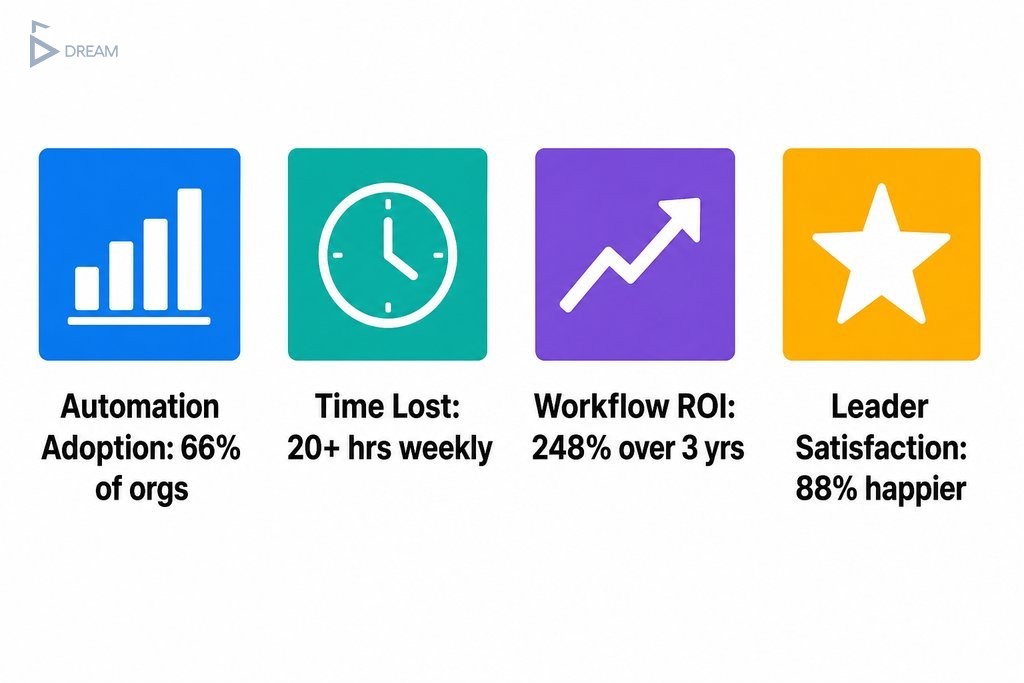
Scaling a business creates a specific kind of operational pressure that smaller teams rarely feel. When your headcount doubles and your client base grows, the administrative surface area expands with it: more onboarding, more reporting cycles, more invoices, more approvals. The systems that worked when the team was small were never designed to carry that weight. According to McKinsey and Company, 66% of organisations have already automated at least one business function, up from 57% the previous year. That shift reflects real pressure to modernise back-office operations across every industry.
What makes this harder is the “software-rich but system-poor” trap. Most growing teams are not short on tools; they are short on connection between them. One team member exports a spreadsheet from one platform and manually copies data into another. A manager waits on an email approval before updating a third system. None of these apps were built to work together, and none of them were built for your specific workflow. The result is a business that is technically equipped but operationally fragmented, burning time on low-value work that compounds every week. Research from Formstack’s 2022 State of Digital Maturity Report found that 25% of managers devote over 20 hours weekly to repetitive administrative tasks, effectively half a full-time role lost to work that could be systematised.
Where Automating Admin Tasks Pays Off First
Before committing to any tool or platform, step back and map your team’s actual workflow. Walk through a typical week and ask: which tasks happen more than twice, which ones cause the most errors when done manually, and which ones create the most delay for everyone else when they slip? That intersection is your starting point.
Tasks that are repetitive, low-judgment, and time-sensitive tend to deliver the fastest return when automated, and they are usually easier to implement correctly because the logic behind them is already consistent. Common high-impact areas include client onboarding sequences, invoice generation and payment follow-up, employee timesheet collection, scheduling and booking workflows, internal status reporting, and data entry between platforms.
These are not glamorous processes, but they are often the ones silently consuming the most hours across your team. The goal at this stage is not to eliminate all manual admin at once. It is to identify the two or three workflows where automation removes the most friction and gives your team back meaningful time.
How to Tell When a Task Is Ready to Automate
A task is generally ready to automate when it meets three conditions:
- It follows a predictable, repeatable pattern every time it occurs.
- It requires no real judgment call or contextual interpretation.
- It happens frequently enough that the setup time pays back within a reasonable period.
Sending a standard welcome email after a form submission, generating a weekly report from existing data, or routing an invoice through a standard approval chain are textbook candidates. They follow rules, they repeat constantly, and every hour spent doing them manually is an hour your team could spend on work that actually requires their skill and attention. If a task looks slightly different every time, or depends heavily on human reasoning, it belongs in a different category for now.
Office Automation Ideas That Work Across Departments
Thinking department by department makes it easier to find practical entry points without getting overwhelmed. These office automation ideas for small teams apply across industries because they target universal administrative pain points rather than niche processes. The focus here is on outcomes rather than specific tools, because the right tool depends entirely on your current setup and the complexity of your workflows.
- Operations: Automating task assignment and status updates eliminates manual check-ins and reduces the chance of work falling through the cracks.
- Finance: Automated invoice creation, payment reminders, and expense routing remove hours of manual reconciliation each month.
- Sales: Automating follow-up sequences and lead routing ensures no enquiry goes cold because someone forgot to send an email.
- HR administration: Digital onboarding workflows, timesheet collection, and leave request processing remove significant manual burden from managers and create a more consistent experience for staff.
| Department | Common Admin Pain Point | Automation Opportunity |
|---|---|---|
| Operations | Manual task assignment and progress check-ins | Automated task routing and status updates |
| Finance | Manual invoice creation and payment follow-up | Automated invoice generation and payment reminders |
| Sales | Missed follow-ups and inconsistent lead routing | Automated follow-up sequences and lead assignment |
| HR Administration | Manual onboarding, timesheets, and leave requests | Digital onboarding workflows and automated timesheet collection |
The Healthcare Financial Management Association has noted that the strongest business cases for automation are built around solving specific operational problems, not just chasing financial savings. That principle holds across every industry and team size.

How Automated Admin Workflows Connect Your Whole Operation
Individual automation tools solve individual problems, but they do not necessarily make your business run more smoothly overall. When each department automates in isolation, you can end up with a slightly different version of the same fragmentation problem you started with.
Automated admin workflows become genuinely useful when they are designed around the full arc of how your business operates: from a client enquiry landing in your system all the way through delivery, invoicing, and follow-up, with each step triggering the next without manual handoffs. This connected approach is what separates a patched-together set of automations from a real operational system.
When your workflows are built to mirror how your team actually works, rather than how a generic software platform assumes you work, the compounding efficiency gains become significant. Forrester Research’s 2024 Total Economic Impact study found that enterprises deploying workflow automation platforms achieved a 248% return on investment over three years. Results at that scale come from building an interconnected system that eliminates friction at every handoff point, not from automating one task in isolation. Results for smaller businesses will vary depending on the scope and quality of implementation.
Custom Solutions vs. Off-the-Shelf Software for Vancouver Businesses
Generic automation platforms work well for businesses with standard workflows that match what the tool was designed to handle. If your processes are relatively linear and you operate within the constraints of a popular CRM or project management tool, an off-the-shelf solution may be entirely sufficient.
However, teams with unique processes, compliance requirements, or workflows that span multiple systems often find that no-code tools require significant workarounds, creating new inefficiencies in place of old ones. This is something many Vancouver-area businesses encounter as they grow beyond the early startup stage and their operations become more complex.
A custom-built workflow system becomes the more practical long-term investment when your business has outgrown what generic platforms can accommodate cleanly. Rather than reshaping how your team works to fit a tool, a purpose-built solution is built to fit your team. The upfront investment is higher, but the operational fit, scalability, and reduced reliance on multiple recurring subscriptions often make it a more economical choice over time. Whether it is the right fit depends on the complexity and uniqueness of your workflows.
| Factor | Off-the-Shelf Software | Custom-Built Solution |
|---|---|---|
| Upfront cost | Low | Higher |
| Ongoing licensing costs | Recurring monthly fees per tool | Typically lower over time |
| Fit for standard workflows | High | Varies by scope |
| Fit for complex or unique workflows | Low, often requires workarounds | High, built around your processes |
| Scalability as business grows | Limited by platform constraints | Designed to scale with your operation |
| Compliance and audit documentation | Varies, often limited | Can be built to meet specific requirements |
| Integration with legacy systems | Difficult or unsupported | Fully customisable |

What to Check Before You Reduce Manual Admin Work
Automation moves fast when it goes wrong, so due diligence before implementation protects you from amplifying existing problems rather than solving them.
Start by auditing your current workflows in detail: document each step, identify where data enters the system, and note any points where human judgment genuinely matters. This audit often surfaces data quality issues that need to be resolved before automation can work reliably, along with dependencies you might not have noticed while doing everything manually.
Equally important is setting realistic expectations around adoption. Automating approval workflows, for instance, only delivers value if your team uses the new process consistently, which means change management is part of the implementation, not an afterthought. Plan for a transition period where both the old and new processes run in parallel until confidence is established. Be clear internally about which steps remain human-managed and why. Automation works best when it handles the predictable parts and leaves people space to handle the exceptions.
When to Bring in a Development Partner for Back Office Automation in Vancouver
There is a clear point at which back office automation requirements exceed what no-code platforms can reliably handle. If your workflows involve multiple data sources that need to communicate in real time, complex conditional logic, integration with legacy systems, or compliance requirements that demand audit-ready documentation, a technical development partner becomes the more dependable path. Trying to force that level of complexity through a drag-and-drop tool typically results in a fragile system that breaks under the weight of real-world use.
A strong development partnership does not require you to become a technical expert. The right partner takes your description of how your business works and translates it into a system that mirrors that reality, without burdening you with implementation decisions. At Twelfth Dream, based in Vancouver, that is exactly how the process works: you describe what you need, and a dedicated in-house team of business analysts, designers, developers, and QA specialists handles everything from planning through deployment.
The result is a purpose-built operational system that grows with your business rather than constraining it. According to SS&C Blue Prism’s Empower the People research report, 88% of business leaders surveyed said that automating administrative work would make them both happier and more engaged at work. The opportunity is clear. The question is whether your current tools are actually capable of delivering it.
If your team is spending hours each week on admin work that a well-built system could handle automatically, the cost of waiting adds up quickly. Reach out to Twelfth Dream to talk through where automation could make the biggest difference in your operation. You describe the problem, and the team takes it from there.
Frequently Asked Questions About Automating Admin Tasks
What types of admin tasks are easiest to automate first?
The easiest tasks to automate are repetitive, rule-based, and happen on a regular schedule. Invoice generation, client welcome emails, timesheet reminders, and internal status reports are strong starting points because they follow consistent logic and require no human judgment to complete.
How much does it cost to automate admin workflows for a small business in Vancouver?
Costs vary depending on workflow complexity and your chosen approach. Off-the-shelf tools like Zapier or Make carry monthly subscription fees, while a custom-built solution involves a higher upfront investment but typically reduces ongoing licensing costs across multiple platforms. The right fit depends on how complex and unique your processes are.
How long does it take to implement a business automation system?
Simple automations using no-code tools can be set up in days. A custom-built workflow system designed around your specific operations typically takes several weeks, depending on scope, integrations required, and the complexity of approval logic. Running the old and new processes in parallel during a transition period is recommended before fully switching over.
When does a growing business need a custom automation solution instead of off-the-shelf software?
When your workflows span multiple systems, involve complex conditional logic, or require compliance documentation, off-the-shelf tools often produce workarounds that introduce new inefficiencies. A custom solution becomes more practical when generic platforms require you to change how your team works rather than supporting how it already works.
Does automating admin tasks reduce the need for staff?
Automation typically reduces the time staff spend on low-value, repetitive work rather than reducing headcount. The practical benefit is that your existing team can redirect their time toward higher-judgment work, improving both output quality and job satisfaction without necessarily changing the size of your team.