Key Takeaways
Growing businesses in Canada can replace broken spreadsheets and generic tools with custom inventory and order management apps built around how they actually work.
- Generic inventory tools create compounding gaps as your business scales; a purpose built app mirrors your real workflows and removes the manual workarounds your team depends on today.
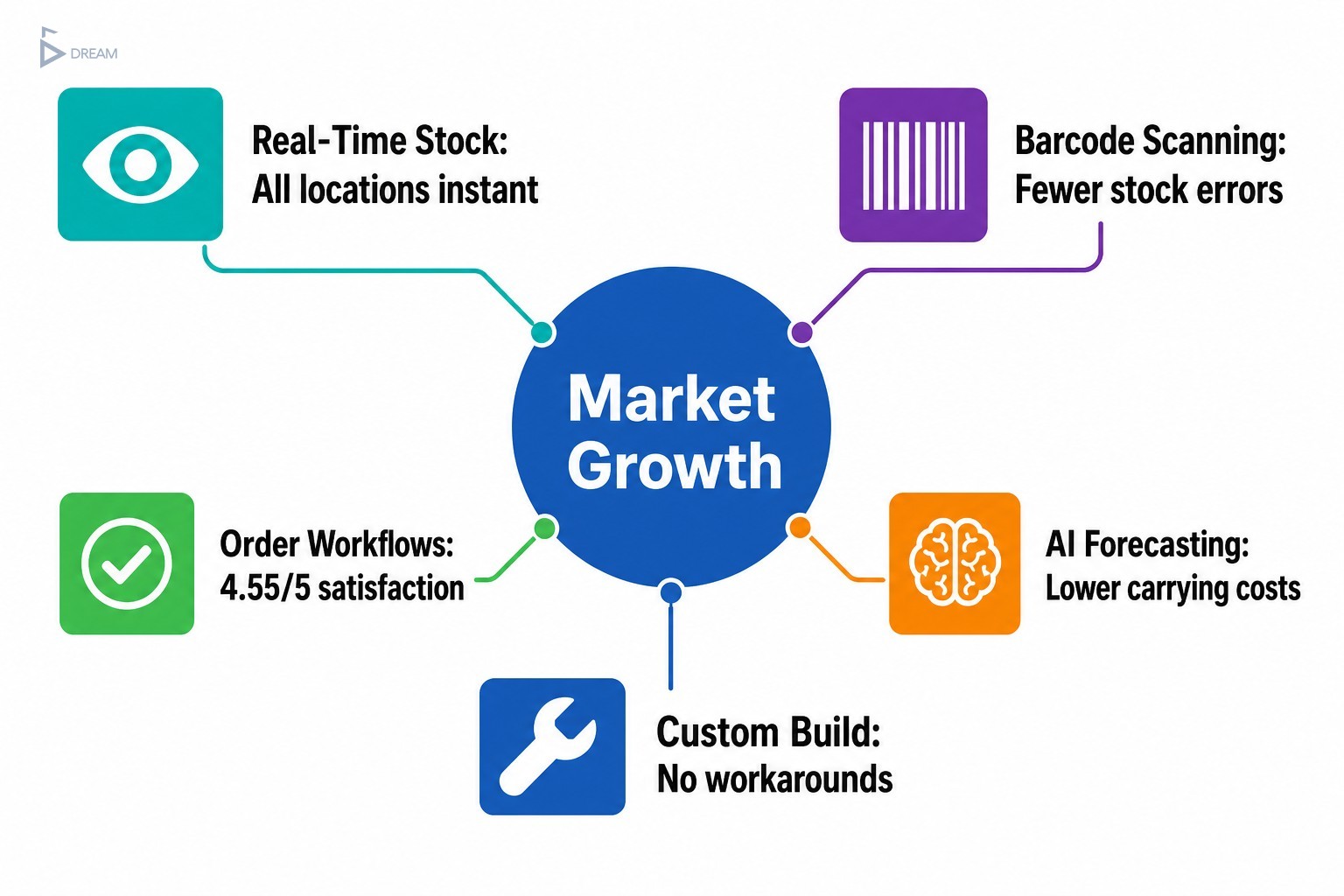
- Core inventory app features worth prioritising include real time stock visibility, multi location tracking, automated reorder triggers, barcode scanning, and audit trails that reduce human error across daily stock movements.
- Order management workflows should follow an order from placement through to delivery confirmation automatically, without relying on team members to manually push it from one stage to the next.
- Smart capabilities like AI assisted demand forecasting and integration ready architecture mean your custom app grows with your business rather than becoming another limitation to work around.
- Before building, map your actual workflows in detail to find where real friction lives, confirm your integration points early, and define clear success metrics so you know whether the finished system is delivering results.
When your business starts growing faster than your systems can handle, the cracks show up in predictable places. Orders slip through. Stock counts drift. Someone is always chasing a spreadsheet that was last updated three days ago. If this sounds familiar, your tools are not the problem. They were never built for how you actually work. Exploring what to build into a custom inventory or order management app is not about finding shinier software. It is about designing something around your real operations so your team can stop managing workarounds and start managing growth.
According to Global Market Insights, the inventory management software market crossed USD 3.9 billion in 2024 and is projected to grow at around 6.4% annually through 2034. That growth reflects a clear business reality: more companies are recognising that generic tools leave money and productivity on the table. For scaling business owners in Vancouver and across British Columbia, a purpose-built system is not a luxury. It is the infrastructure that makes everything else possible.
Table of Contents
Why Off-the-Shelf Apps Stop Working as You Scale
Most inventory and order management tools are built to satisfy the average business, which means they work reasonably well for no one in particular. When your operation is small and your workflows are simple, that is manageable. But as your team grows and your processes become more specific, the gaps between what the software does and what your business needs start to compound.
The signs are usually clear: your team spends time on data entry that should be automated, inventory figures never quite match reality at month end, and orders fall through because one channel does not talk to another. These are not workflow discipline problems. They are system design problems.
Generic platforms also carry features you will never use, alongside pricing that keeps rising as you unlock the capabilities you actually need. Smaller and mid-sized businesses are consistently underserved by dominant enterprise vendors, and that gap is exactly where a custom solution earns its value. Whether you operate out of Mount Pleasant, South Vancouver, or manage fulfilment across the Lower Mainland, business process automation with custom apps starts by asking what your business specifically needs, then building precisely that.
Core Inventory App Features That Reflect How You Work
The difference between a useful inventory app and a frustrating one usually comes down to whether the features map to real operational moments. The features that matter most are real-time stock visibility, which prevents your sales team from committing inventory that no longer exists; multi-location tracking, essential when product is spread across a warehouse, retail floor, and third-party fulfillment partner; smart low-stock alerts triggered by your actual reorder lead times rather than generic thresholds; and built-in supplier management that closes the loop between what you have, what you need, and who provides it.
“The adoption of advanced inventory management software is transforming how businesses manage their inventory, leading to enhanced operational efficiency, reduced costs, and improved decision-making capabilities,” according to Global Market Insights. The key word is advanced. Not complex, not enterprise-grade. Advanced in the sense that the system is thoughtful about your context. A custom-built app carries exactly the features your team will use every day, without the noise of everything else.
| Core Feature | What It Does | Problem It Solves |
|---|---|---|
| Real-time stock visibility | Shows current stock levels across all locations instantly | Prevents overselling inventory that no longer exists |
| Multi-location tracking | Manages product across warehouse, retail floor, and fulfillment partners | Eliminates confusion when stock is spread across multiple sites |
| Smart low-stock alerts | Triggers reorder notifications based on your actual lead times | Replaces generic thresholds that cause either overstocking or stockouts |
| Built-in supplier management | Connects stock levels to supplier records and purchase order workflows | Closes the loop between what you have, what you need, and who provides it |
Stock Tracking App Ideas for Product-Based Businesses
For businesses in retail, wholesale, or manufacturing, stock tracking goes well beyond simple quantity counts. Depending on what you sell, you may need batch tracking to know which production run a product came from, expiry management for food or pharmaceutical products where shelf life affects safety and compliance, and serial number tracking to support warranty management and post-sale service. Smart receiving workflows flag discrepancies at intake rather than weeks later during a stock count, bulk receiving with automatic bin assignment reduces time spent organising product on arrival, and raw material consumption tracking ties inventory depletion to production activity in real time. Each of these addresses a specific pain point that a standard app is unlikely to handle without significant customisation.
Inventory Control Software Features Worth Prioritising
Reducing manual errors is where inventory control features earn their place. Barcode scanning is one of the most impactful upgrades a product-based business can make. A GS1 study cited by Fortune Business Insights found that barcode-based workflows contributed to a meaningful reduction in stock discrepancies and medication errors in healthcare settings. The operational principle applies broadly: structured scanning reduces the human error that accumulates across hundreds of daily stock movements. Barcode inventory app features deserve dedicated attention when planning your build.
Automated reorder triggers generate purchase orders before you run short, based on minimum thresholds and supplier lead times. Audit trails provide full accountability across every stock movement, supporting reconciliation, compliance, and error tracing. Together, these features create a system that manages itself within defined rules, freeing your team to focus on decisions that actually require human judgment.

Order Management Workflows That Remove Bottlenecks
Order management is where inventory accuracy meets customer experience. A well-designed workflow follows an order from placement through picking, packing, dispatch, and delivery confirmation, without requiring a human to manually push it from one stage to the next.
The problem with most growing businesses is that their order flow was designed informally, one workaround at a time. It now depends on people remembering to do things rather than systems triggering them automatically. A purpose-built app mirrors the order logic your team already uses, rather than forcing them to adapt to software designed for a different type of business.
A research study published by the ACM 15th International Conference on E-Education, E-Business, E-Management and E-Learning found that systems combining order management, inventory control, and sales analytics achieved a user satisfaction rating of 4.55 out of 5 and drove measurable business profitability. Isolated tools rarely produce the same result.
Order Tracking System Ideas for Vancouver’s Multi-Channel Businesses
Businesses selling across multiple channels face a specific challenge: each channel generates orders in a different format, with different fulfillment expectations and customer communication requirements. This is especially true for Vancouver businesses managing both local retail foot traffic and online sales that ship across Canada or into the US Pacific Northwest.
Effective order tracking for multi-channel operations requires a unified order view that consolidates orders from your e-commerce store, wholesale portal, and point-of-sale system without manual re-entry. Real-time status updates, automated customer-facing notifications, return handling workflows that trigger restocking logic automatically, and exception management that flags and routes problem orders without manual intervention are all essential. According to order tracking workflow best practices, real-time status visibility is the baseline expectation and everything else builds from there. When your order tracking handles these workflows consistently, your team stops firefighting and your customers stop chasing updates.
| Order Tracking Capability | What It Handles | Benefit for Multi-Channel Operations |
|---|---|---|
| Unified order view | Consolidates orders from e-commerce, wholesale portal, and POS | Eliminates manual re-entry across channels |
| Real-time status updates | Tracks each order through picking, packing, dispatch, and delivery | Gives your team and customers accurate visibility at every stage |
| Automated customer notifications | Sends status updates without manual intervention | Reduces inbound customer enquiries and support load |
| Return handling workflows | Triggers restocking logic automatically when returns are received | Keeps inventory accurate without additional manual steps |
| Exception management | Flags and routes problem orders for resolution | Prevents issues from falling through the cracks during high-volume periods |
Smart Features That Grow With Your Business
Building a custom app is an opportunity to think ahead, not just solve today’s problems. AI-assisted demand forecasting surfaces patterns in historical sales data that manual review would miss. Research referenced by McKinsey and Company suggests AI-powered inventory systems can meaningfully reduce forecast errors, contributing to faster inventory turnover and lower carrying costs, though results vary by industry and implementation quality. Intelligent reorder suggestions account for seasonality, supplier lead time variability, and sales velocity. Integration-ready architecture allows you to connect new sales channels, accounting platforms, or logistics partners without rebuilding your system.
Analysis of nearly 4,600 inventory-focused startups by StartUs Insights identified AI-driven demand forecasting, third-party logistics integration, and cloud-based multi-location order management as the dominant innovation areas shaping next-generation inventory apps. Smart features are not just about what the app does today. They are about what it can become as you scale.

What to Verify Before You Build a Custom App
The most expensive mistake in custom software development is building the wrong thing with precision. Before a single line of code is written, map your current workflows in detail to identify where your team actually loses time, makes errors, or creates manual workarounds. Identify integration points early to prevent the scenario where a finished app cannot connect to your accounting software or e-commerce platform without a costly retrofit. Define success metrics before development begins so you know whether the finished system is working, rather than relying on a general sense that things feel better.
Common pitfalls include scoping features based on what sounds useful rather than what solves a documented problem, and underestimating the complexity of migrating historical data from legacy systems. A well-run discovery process, led by people who ask the right questions, protects you from all of these.
How a Structured Build Process Protects Your Investment
One of the most common concerns business owners have about custom development is losing control once it starts. A structured, adaptive delivery model addresses this directly. Rather than disappearing for months and returning with a finished product, a step-by-step approach keeps you informed at each stage, without requiring you to manage technical decisions yourself.
Twelfth Dream’s process reflects exactly this kind of build discipline. Every project follows a structured six-step process covering discovery, planning, design, development, testing, and deployment, with on-time and on-budget delivery as a core commitment rather than an aspiration. Support and continuous updates after go-live mean your system evolves alongside your business rather than becoming a new form of technical debt. For Vancouver business owners who have been burned by development projects that drifted, this kind of framework matters more than it might initially seem.
Turning App Ideas Into a Working Inventory System
The distance between a compelling idea and a working system is a structured process and the right development partner. Start by prioritising features around the workflows that cost you the most time or the most errors today. A phased build approach lets you launch a focused first version quickly, gather real user feedback, and expand in directions that experience confirms rather than initial assumptions guessed.
When evaluating a development partner, ask whether they take the time to understand your business before proposing a solution, whether they communicate in plain language without requiring you to manage technical complexity, and whether they have a clear process for delivering on scope, timeline, and budget. If you are ready to turn your ideas into a system that mirrors exactly how your business works, Twelfth Dream is built for that conversation. Reach out and tell us what you need. We will handle everything else.
Frequently Asked Questions
What is the difference between inventory management and order management?
Inventory management tracks what stock you have, where it is, and when to replenish it. Order management handles the lifecycle of a customer order from placement through fulfillment and delivery. The two systems work best when integrated, so stock levels update automatically as orders are processed and fulfilled.
When should a business consider building a custom inventory app instead of using off-the-shelf software?
A custom build makes sense when your workflows are specific enough that generic tools require significant workarounds, when your team is spending time on manual data entry that should be automated, or when your multi-location or multi-channel setup exceeds what standard platforms handle well without costly add-ons.
What features should a stock tracking app include for a small product-based business?
At minimum, a small product-based business needs real-time stock visibility, low-stock alerts tied to actual reorder lead times, and a receiving workflow that flags discrepancies at intake. As the business grows, batch tracking, supplier management, and barcode scanning add meaningful accuracy with minimal extra effort from the team.
How does barcode scanning improve inventory accuracy?
Barcode scanning replaces manual data entry at each stock movement, which is where most inventory errors originate. Each scan creates an automatic, timestamped record that feeds directly into your stock count. This reduces the cumulative drift between your system records and physical stock that tends to compound over time in high-volume operations.
Can a custom inventory app integrate with existing e-commerce or accounting platforms?
Yes. A well-architected custom app is built with integration in mind from the start, connecting to platforms like Shopify, QuickBooks, or your preferred logistics provider through APIs. Identifying these integration points during the discovery phase prevents costly retrofits after the system is already built and deployed.
What does a phased approach to custom app development mean in practice?
A phased approach means launching a focused first version of the app that solves your highest-priority problems, then expanding based on real usage feedback rather than initial assumptions. This reduces upfront risk, gets your team working with the new system sooner, and ensures later features are shaped by how your business actually uses the tool.