


At some point, every growing business hits the same wall. The tools that helped you land your first twenty clients start working against you when you have two hundred. Spreadsheets multiply, follow-up emails get missed, and your team spends more time managing software than serving clients. If that friction sounds familiar, exploring custom CRM and client portal ideas is often the most direct path to reclaiming operational clarity. This article walks through the features, planning decisions, and design thinking that matter most before you commit to building a system that fits how your business actually works.
Building a CRM and client portal is one expression of business process automation with custom apps — a broader discipline that includes dashboards, workflow tools, and inventory systems. The decisions covered here focus specifically on client-facing and relationship management infrastructure, with attention to what scaling teams in Vancouver and across British Columbia need to evaluate before development begins.
Table of Contents
Off-the-shelf CRMs are built to work for as many businesses as possible, which means they are optimised for none of them specifically. When your team is small, the compromises feel manageable. You build workarounds, use a few extra tabs, and move on. But as headcount grows and client relationships become more complex, those workarounds compound. What started as a minor inconvenience becomes a structural problem where your workflows are shaped by the software’s limitations rather than your actual business logic.
The real cost is not the subscription fee — it is the invisible drag on your team’s productivity. Duplicate data entry, manual handoffs, and status updates buried in someone’s inbox all add up. A disconnected tech stack forces team members to become human middleware, bridging gaps that a well-designed system would close automatically. For a business owner in Vancouver — whether running a consultancy in Yaletown, a professional services firm downtown, or an agency across the Lower Mainland — this is a growth ceiling that no amount of hiring will fix without addressing the underlying system architecture.
More than 90% of companies with ten or more employees use a CRM, according to Grand View Research — but using one does not mean it is actually serving the business well. The gap between a generic CRM and one built around your exact workflow is where custom builds earn their value. Custom CRM features for growing teams centre on automation, visibility, and logic that matches how your team already thinks about clients.
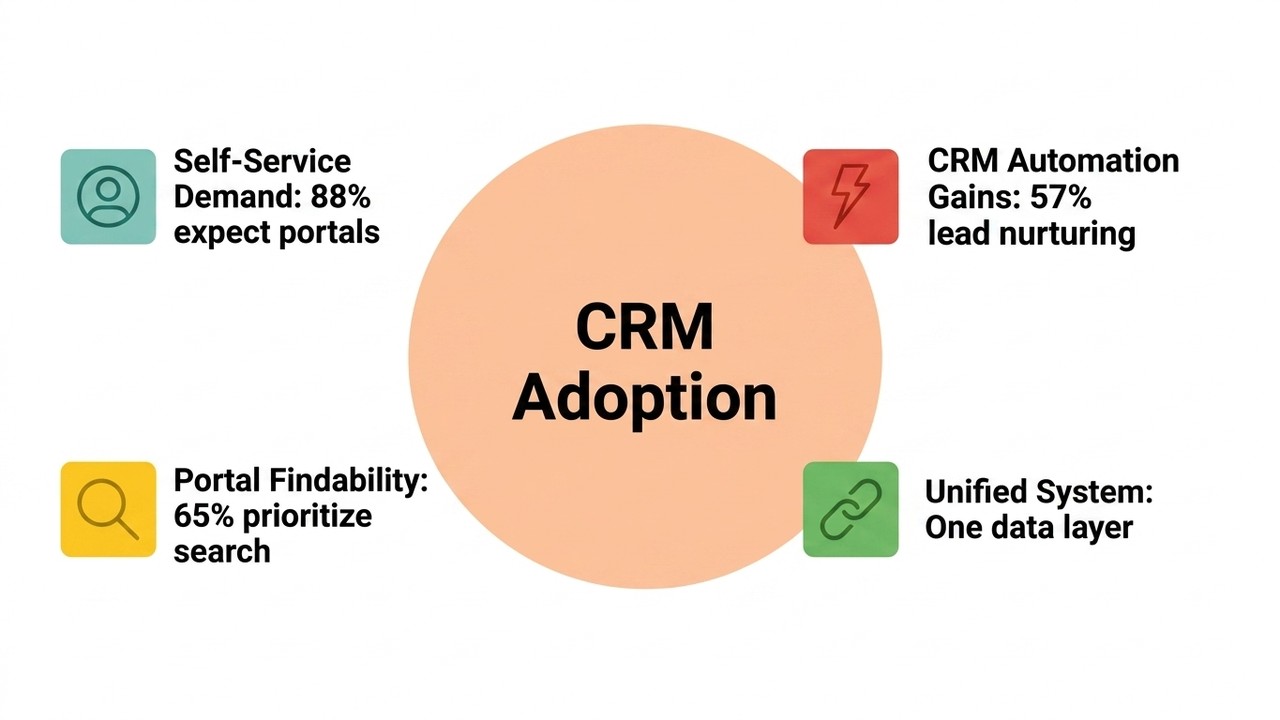
The most valuable features for scaling businesses include automated follow-up sequences that reduce the mental load of tracking touchpoints, role-based pipeline views that surface relevant information for each team member, and client health scoring that flags disengaged accounts before they become a problem. Research from Pipeline CRM found that CRM automation supports lead nurturing at 57%, customer engagement at 36%, and campaign reporting at 28% — gains that tend to compound when the system is built around real business behaviour rather than generic defaults.
Agencies, consultancies, and professional service firms have specific needs that generic CRMs frequently underserve. The most useful additions for these businesses are milestone tracking tied directly to client records, team assignment logic that routes new projects based on service type or capacity, and contract status visibility that gives leadership a clear picture without requiring anyone to produce a manual report.
Businesses with ongoing client relationships and renewal cycles need a different layer of intelligence. Renewal alerts triggered well before contract expiry give account managers enough lead time to re-engage without pressure. Deal stage automation moves records through the pipeline based on actual events — a signed document, a received payment, a completed onboarding call — rather than manual updates. Revenue forecasting views pull from active deal stages and renewal probabilities to give leadership a clearer picture of projected income, which is particularly useful when making staffing or investment decisions mid-quarter.
| Feature | Service-Based & Project-Driven | Sales-Heavy & Recurring Revenue |
|---|---|---|
| Milestone tracking tied to client records | High priority | Low priority |
| Team assignment logic by service type or capacity | High priority | Medium priority |
| Contract status visibility | High priority | High priority |
| Renewal alerts before contract expiry | Medium priority | High priority |
| Deal stage automation based on real events | Medium priority | High priority |
| Revenue forecasting views | Medium priority | High priority |
| Automated follow-up sequences | High priority | High priority |
| Client health scoring | High priority | High priority |
Research cited via monday.com found that 88% of customers expect organisations to offer some form of online self-service portal. A portal is no longer a premium feature — it is a baseline expectation. The challenge is not building one; it is building one that clients actually log into.
Most portals fall short not because of missing features but because of poor design thinking. If the portal does not immediately show a client something useful — their current project status, an outstanding invoice, a document waiting for approval — they will default to emailing your team instead, which defeats the purpose entirely.
Effective client portal ideas are organised around what clients genuinely need at any given moment: project status visible without navigating multiple menus, invoices accessible and payable in the same place, shared files that are versioned and searchable, direct commenting on tasks or deliverables, and document approvals with timestamps and a clear audit trail. Research from the National Association of Wholesaler-Distributors found that approximately 65% of B2B buyers prioritise advanced search functionality — a signal that findability inside a portal directly influences how clients experience your business.
One of the most immediate returns from a well-built portal is the reduction of recurring check-in calls and status emails. When clients can see a real-time update, download the latest deliverable, and comment directly on a task, weekly status calls become less necessary. A centralised communication thread tied to each project ensures nothing gets lost in an inbox, and both sides maintain a clear record of what was discussed and when.
Portal planning is where the most expensive mistakes either happen or get prevented. The decisions made before development begins shape everything from search functionality to reporting capability. Four planning steps make a meaningful difference:
Starting without this clarity is one of the most common reasons custom builds accumulate scope creep — not because developers make poor decisions, but because the requirements were never stable enough to build around confidently.
A CRM is an internal-facing tool for your team’s operations. A client portal is an external-facing platform for your clients’ access and collaboration. They serve distinct but deeply complementary functions — and when they share the same underlying data layer, they create something more valuable than either does alone.
A documented case involving Tellimer showed that integrating a self-service client portal directly with a Dynamics 365 CRM delivered a unified view of all client interaction details, research preferences, and history — reducing the data silos that typically require manual reconciliation.
“In a highly regulated industry such as ours, you need to be certain you’re working with a partner that truly understands your business and can deliver on every count.” — Rob Elliott, Tellimer, The Portal Company
Client management software that spans both layers — shared task lists, real-time status syncing, unified communication history — reduces the toggle tax: the hours lost each week as team members switch between tools that do not share data. A unified system means your team sees exactly what the client sees, and both sides work from a single source of truth.
| Dimension | Custom CRM | Client Portal |
|---|---|---|
| Primary audience | Internal team | External clients |
| Core purpose | Manage relationships, deals, and workflows | Provide client access, visibility, and collaboration |
| Typical actions | Pipeline management, follow-ups, reporting | View project status, download files, approve documents |
| Communication layer | Internal notes and team activity logs | Client-facing threads and task comments |
| Best outcome when combined | Shared data layer reduces silos; both sides work from a single source of truth | |
Before commissioning a custom build, three honest questions are worth working through. First, are your internal workflows stable enough to build around? A CRM built on a process that changes every quarter will require constant revision. Second, which integrations are non-negotiable from day one — payroll, accounting, email, or industry-specific tools — and have those APIs been confirmed as accessible? Third, what does a realistic phased release look like, and which features genuinely need to be live on launch day versus available in a later release?
A phased approach — where the first release solves your most painful workflow problems and later releases add sophistication — tends to be more successful than attempting to build everything at once. It also gives real users a chance to interact with the system and surface needs that were not visible during planning.

Twelfth Dream was founded in Vancouver in 2015 with a straightforward premise: business owners should be able to describe what they need and have a dedicated team handle all the technical complexity from there. That premise shapes every custom CRM and portal engagement across Vancouver, the Lower Mainland, and beyond.
Rather than handing a client a feature list and asking them to prioritise it alone, the process begins with structured discovery — understanding how the business actually operates, where the friction lives, and which workflows are stable enough to build around right now. A step-by-step delivery process keeps clients informed at each phase without requiring them to manage technical decisions or decode engineering language. Releases are sequenced around an essential-features-first philosophy, which means the first version of the system addresses the most immediate problems rather than arriving as a bloated platform the team needs months to learn. This reflects a core belief that client portal features customers expect — clarity, speed, and reliability — should be present from day one, not deferred to a future release.
If your business is outgrowing its current tools and you are ready to replace the patchwork with something built specifically for how you work, the Twelfth Dream team is ready to start that conversation with you.
A CRM is an internal tool your team uses to manage client relationships, track deals, and automate workflows. A client portal is an external-facing platform where clients log in to view project status, access documents, and communicate with your team. They serve different audiences but work best when they share the same data layer.
When workarounds start accumulating and your team spends more time managing the software than serving clients, a custom build becomes worth evaluating. This typically happens as client volumes grow, service complexity increases, or your workflows become distinct enough that generic tools require too many compromises to remain practical.
Timeline depends on the scope of features, integrations required, and how clearly requirements are defined at the start. A focused first release is typically faster to deliver than a comprehensive system built all at once. A development partner can provide a realistic estimate after a structured discovery process.
The most common needs are accounting software, email platforms, project management tools, and e-signature or document management systems. Which integrations are essential varies by business type. API access for each connection point should be confirmed before development begins to avoid surprises mid-build.
A well-designed portal significantly reduces email volume by centralising project updates, file sharing, approvals, and direct commenting in one place. It will not eliminate email entirely, but it removes the low-value back-and-forth — status requests, document chasing, approval follow-ups — that consumes team time without adding value.