Key Takeaways
Barcode inventory app features only deliver value when they directly address real workflow gaps rather than generic use cases your operation must adapt around.
- Real time barcode stock tracking across multiple locations eliminates the lag between physical counts and system records, giving your entire team accurate data the moment a scan happens.
- Scan based inventory control at both receiving and dispatch catches discrepancies before they compound, reducing fulfillment errors and downstream corrections significantly.
- Custom workflow logic removes the side spreadsheets and manual workarounds that accumulate when an off the shelf platform cannot accommodate your actual process.
- Before evaluating any platform, audit where errors are entering your current workflow today so you know which barcode system features are essential and which are irrelevant to your operation.
- When the number of workarounds your team manages equals the processes your app handles, a purpose built solution becomes the more practical and cost effective path forward.
When a growing operation starts losing hours to manual recounts, mismatched stock levels, and fulfillment errors, the instinct is to search for a better barcode inventory app. The features list looks promising, the demo runs smoothly, and the price seems reasonable. But within a few months, the same gaps resurface in a slightly different form. The problem is rarely the team and rarely the effort. It is almost always that the app was built for a generic workflow, and your operation is anything but generic.
This article walks through which barcode inventory app features genuinely close workflow gaps, which ones are worth paying for, and when a purpose-built solution becomes the more practical choice.
Barcode inventory management is one component within the larger subject of inventory and order management app ideas, and the decisions you make here will directly shape downstream processes such as order tracking workflow best practices. Getting the inventory layer right first is what makes everything else more reliable.
Table of Contents
Why Generic Barcode Apps Often Miss the Mark
Off-the-shelf barcode inventory apps are designed around the average business, which means they are optimized for no business in particular. A retail shop receiving pallets twice a week operates very differently from a Vancouver distributor managing three warehouse locations and a direct-to-consumer channel at the same time. Yet both are handed the same system and expected to adapt.
The features themselves are not the issue. Features without workflow context are just buttons no one uses consistently. According to GS1 UK, manual data entry carries roughly a 1% error rate, around one mistake per 100 keystrokes. That number compounds fast when your team is working around a system rather than through it, copying data between a barcode app and a spreadsheet because the two do not connect the way your process actually flows.
A feature list only matters when you can draw a direct line between that feature and a real problem in your current operation. Without that line, you are paying for capability you will not use while still patching the gaps manually.
Which Barcode Inventory App Features Actually Improve Stock Accuracy
Stock accuracy is not a data problem. It is a process problem. The right features address the process at its most vulnerable points.
IHL Group estimated that inventory distortion, the combined cost of stockouts and overstocks, reached $1.7 trillion globally in 2024, with approximately $1.2 trillion attributable to stockouts alone. Those numbers reflect what happens at scale when inventory data lags behind physical reality.
Three features reduce this gap most directly:
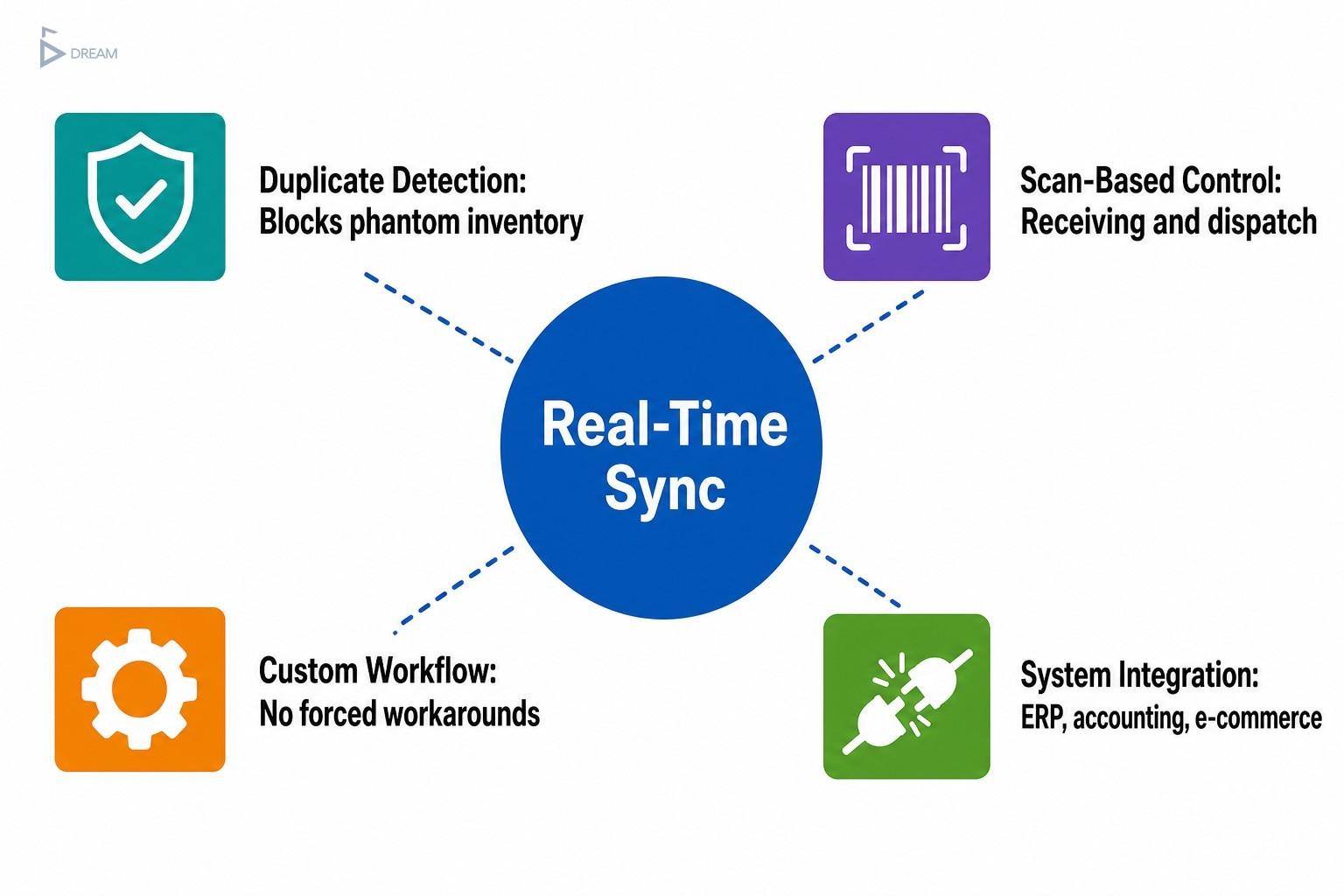
- Real-time synchronization updates available quantity instantly across every connected channel with each scan.
- Duplicate detection flags items scanned twice before the record is committed, catching phantom inventory before it appears weeks later.
- Automatic stock adjustments are triggered at the point of scan rather than entered manually afterward, removing an entire category of human error from the chain.
Together, these capabilities address the most common breakdown points without requiring your team to change how they think about their work.
| Feature | Workflow Problem It Solves | Impact on Accuracy |
|---|---|---|
| Real-time synchronization | Lag between physical counts and system records | High — eliminates delayed updates across all channels |
| Duplicate detection | Phantom inventory from double-scanned items | High — catches errors before they are committed |
| Automatic stock adjustments | Manual entry errors after scanning | High — removes a full category of human error |
Real-Time Stock Tracking Across Multiple Locations
For businesses managing more than one warehouse, shop, or sales channel, the lag between a physical count and a system record is where most discrepancies are born.
Real-time barcode stock tracking eliminates that lag by treating every scan as an immediate update visible to the entire team. Modern mobile-first apps compatible with iOS and Android allow warehouse and floor staff to scan and update stock from any device, meaning location is no longer a barrier to accurate data. For a Vancouver business running operations across multiple sites, whether in Burnaby, Surrey, or the Fraser Valley, a team member adjusting a bin count at a secondary location is reflected instantly in the main system rather than waiting for an end-of-day sync or a manual export.
For scaling operations, this visibility is not a luxury. It is the foundation that makes confident reorder decisions possible.
Scan-Based Control at Receiving and Dispatch
The two highest-risk moments in any inventory cycle are when stock comes in and when it goes out.
Scan-based control at both ends of the supply chain catches discrepancies before they compound. When a shipment arrives, scanning each item against a purchase order immediately surfaces shortages, substitutions, or unexpected overages. When an order ships, scanning against the pick list confirms the right items are leaving before the box is sealed.
This two-checkpoint approach is far more reliable than end-of-period audits, which find errors long after the window to correct them has closed. Businesses that apply scan-based receiving and dispatch consistently report fewer downstream corrections and fewer customer complaints tied to incorrect fulfillment.
What Makes a Barcode Inventory Workflow Scalable
A well-designed barcode inventory workflow turns receiving, picking, packing, and auditing into a repeatable sequence that any trained team member can execute accurately. The key word is repeatable.
When workflows are improvised across disconnected spreadsheets and loosely connected tools, accuracy depends on individual memory and habit rather than system structure. That works when your team is small and you can see everything happening in real time. It breaks down the moment volume increases, staff turns over, or a second location enters the picture.
Custom Workflow Logic vs. Forced Workarounds
There is a meaningful difference between an app that adapts to how your team works and one that requires your team to change their process to fit the software.
Most SaaS barcode platforms offer configuration options within defined boundaries. Those boundaries are often fine for standard retail or simple warehousing, but they become visible obstacles when your operation has a non-standard receiving process, a unique kitting workflow, or a return handling method that does not map to the default flow. This is a common reality for Vancouver businesses managing both local wholesale accounts and e-commerce channels simultaneously.
Forced workarounds accumulate quietly. A team member builds a side spreadsheet to track something the app does not handle. Another creates a manual step to compensate for a sync delay. Over time, the workarounds become the real system, and the app becomes one more layer to maintain. Platforms built with custom workflow logic remove those workarounds entirely by encoding your actual process rather than approximating it.
| Consideration | SaaS Barcode Platform | Custom-Built Solution |
|---|---|---|
| Workflow fit | Configured within fixed boundaries | Built around your exact process |
| Non-standard logic (kitting, returns) | Often requires workarounds | Encoded directly into system behaviour |
| Team adaptation required | Medium to high | Low — system adapts to team |
| Ongoing maintenance | Subscription plus workaround upkeep | Purpose-built, fewer manual patches |
| Best suited for | Standard retail or simple warehousing | Complex, multi-channel, or scaling operations |

Which Barcode System Features Are Worth Paying For
Not every feature on a vendor’s pricing page will affect your daily accuracy. For small-to-mid-sized operations, the features that justify investment are those tied directly to your team size, SKU volume, and order frequency.
Features worth the investment include ERP, accounting, and e-commerce integration, because disconnected systems are where errors multiply fastest. Support for both 1D and 2D barcode formats is essential if you need item-level traceability or batch tracking, which is common in food, health, and electronics distribution. A full barcode history log tracks every stock movement over time and gives you the audit trail needed to diagnose errors after the fact rather than guessing.
AI-powered demand forecasting, augmented reality picking guides, and advanced robotics integrations sound impressive but rarely affect daily accuracy for a team of ten to fifty people managing a few thousand SKUs. Evaluating features against your actual operation rather than a projected future state keeps your investment focused and your system lean.
Practical Steps for Evaluating Any Barcode Inventory Platform
Before selecting any barcode inventory app, spend time inside your current process rather than inside a vendor demo. The most useful question to answer first is: where are errors actually entering your system today?
Is the problem at receiving, during picking, at dispatch, or during manual count cycles? Mapping that before you look at software tells you which features matter and which are irrelevant to your situation.
These steps help you evaluate any platform more honestly:
- Document your current workflow step by step, including every manual workaround your team uses today.
- Identify the three most common error types and trace each back to the step where it originates.
- Test scan accuracy in your actual environment, including low-light areas, worn labels, and high-traffic moments, not just in ideal demo conditions.
- Ask vendors specifically how their system handles your edge cases, not just standard scenarios.
Vendors rarely volunteer information about what their system does not handle well. Ask directly about offline behaviour, conflict resolution when two users scan the same item simultaneously, and how bulk corrections are managed after an import error.
When a Custom Barcode Inventory App Makes More Sense Than SaaS
There is a point in every scaling operation where configurable platforms stop being a solution and start being a constraint. It usually arrives when the number of workarounds your team maintains equals or exceeds the number of processes the app actually handles.
At that point, the real cost of the platform includes not just the subscription but the staff hours spent managing the gaps around it. Industry data from Unicommerce suggests barcode systems can improve inventory accuracy from around 63% to 99% when implemented effectively, though results depend heavily on how well the system matches the team’s actual workflow. Reaching that level typically requires a system that matches your process rather than one your process has been reshaped to accommodate.
This is where Twelfth Dream’s approach becomes directly relevant. Rather than fitting a growing Vancouver or British Columbia business into the boundaries of an existing platform, the team at Twelfth Dream builds inventory and order management applications around the exact logic a business already uses. The development process starts with discovery, mapping how the team actually works, and then designs system behaviour to match it.
The result is an app where every feature solves a specific, named problem in your operation. No unnecessary modules to maintain, no workarounds to document, and no forced process changes for your team to absorb.
What to Confirm Before Building or Buying Your Next Inventory System
Whether you are evaluating a SaaS platform or considering a custom build, the most useful preparation happens before you speak to any vendor. Involve your team in defining what the system needs to do. The people closest to the workflow know where it breaks.
- Ask your warehouse staff which steps they currently skip or shortcut.
- Ask your operations lead which reports they cannot generate today.
- Ask your customer service team where the most common fulfillment errors originate.
Those answers are your requirements document, and they are worth more than any feature comparison chart.
The right inventory system, whether bought or built, should make your team faster without asking them to think differently about their work. If your current tools are actively limiting your growth, that is the right moment to have a real conversation about what a purpose-built solution could look like for your operation.
Twelfth Dream works with business owners across Vancouver and Canada who are ready to replace patchwork systems with something built to last. Reach out and share what your workflow looks like today. The first step is a conversation, not a commitment.
Frequently Asked Questions About Barcode Inventory Apps
What is the most important feature in a barcode inventory app?
Real-time synchronization tends to have the most immediate impact. It ensures every scan updates stock levels across all connected channels and locations right away, eliminating the lag between physical counts and system records that causes most inventory discrepancies.
Can a barcode inventory app work across multiple warehouse locations?
Yes. Mobile-first barcode apps compatible with iOS and Android allow staff at any location to scan and update stock instantly. The main system reflects changes in real time, so teams at different sites, whether across one city or multiple regions, always see the same accurate data.
When should a business consider a custom-built barcode inventory app instead of SaaS?
When the manual workarounds your team maintains to compensate for the platform’s limitations become unsustainable. If your workflow involves non-standard receiving, kitting, or return logic that a configurable platform cannot accommodate cleanly, a custom build is often the more cost-effective long-term choice.
How does scan-based receiving improve inventory accuracy?
Scanning each incoming item against a purchase order surfaces shortages, substitutions, or overages at the moment of receipt. This catches errors before they enter the system rather than during an end-of-period audit when corrections are far more difficult to make.
What barcode formats should a growing business support?
At minimum, both 1D (standard barcodes) and 2D formats such as QR codes and Data Matrix should be supported. 2D formats are particularly useful for item-level traceability and batch or lot tracking, which is commonly required in food, health product, and electronics distribution.
How do I evaluate a barcode inventory app before committing to it?
Map your current workflow and identify where errors actually enter your process before reviewing any vendor. Test scan accuracy in your real environment rather than a demo setting, and ask vendors directly how their system handles your specific edge cases, offline behaviour, and bulk correction scenarios.