Key Takeaways
Automating approval workflows helps growing businesses replace fragile manual processes with structured, reliable systems that scale without adding technical complexity.
- Map your existing approval process before building anything; automating a poorly defined process only produces a faster version of the same problem.
- A true workflow system routes, escalates, and tracks requests automatically, while a basic form tool simply digitises the submission without removing the coordination burden from your team.
- Start with the single approval workflow that causes the most friction today, document it clearly, and expand from that proven foundation rather than trying to automate everything at once.
- Human oversight still belongs in high stakes or exception based decisions; design escalation paths and final sign off points to protect compliance and accountability alongside automation.
- A custom built system reflects how your business actually makes decisions, so your team adapts the tool to fit your process rather than reshaping your process to fit the tool.
There comes a point in every growing business where the informal systems that once worked perfectly start working against you. What used to be a quick email to one person becomes a chain of follow-ups, missed replies, and decisions that fall through the cracks. For business owners leading teams of ten or more, automating approval workflows is no longer a technical ambition. It is a practical response to a real and measurable problem that compounds quietly until it becomes impossible to ignore.
This article walks through how to approach approval workflow automation with clarity rather than complexity. Whether you are dealing with stalled purchase requests, inconsistent HR sign-offs, or client approvals that drag on for days, the goal is the same: replace fragile, people-dependent processes with structured, reliable ones that scale alongside your business, without requiring you to manage the technology yourself.
Table of Contents
Why Manual Approvals Break Down as Your Team Grows
Small teams survive on trust and proximity. When everyone works on the same handful of projects, informal sign-offs feel efficient. The problem begins when the team grows and those informal habits do not evolve with it. Approval requests start moving through email threads, chat messages, and shared spreadsheets that no one fully owns. According to IDC, knowledge workers spend up to 30% of their working time searching for or recreating information, a problem frequently rooted in poorly structured manual processes exactly like these.
The hidden costs accumulate in ways that are easy to underestimate. Decisions get delayed because the right person never saw the request. Duplicate submissions pile up because the original was never confirmed. Accountability becomes murky when there is no record of who approved what and when.
These are not signs of a disorganised team. They are predictable symptoms of a process that was never designed to handle volume. Manual approvals increase compliance risk because critical steps are easy to skip and difficult to document retroactively, an exposure that grows more serious as the business scales. For teams across Metro Vancouver, where many businesses are growing quickly and operating across multiple locations or remote setups, this kind of friction compounds even faster.
What Automating Approval Workflows Actually Means
Approval workflow automation is not about replacing people with software. It is about removing the coordination burden from people so they can focus on decisions themselves, rather than the logistics of reaching them.
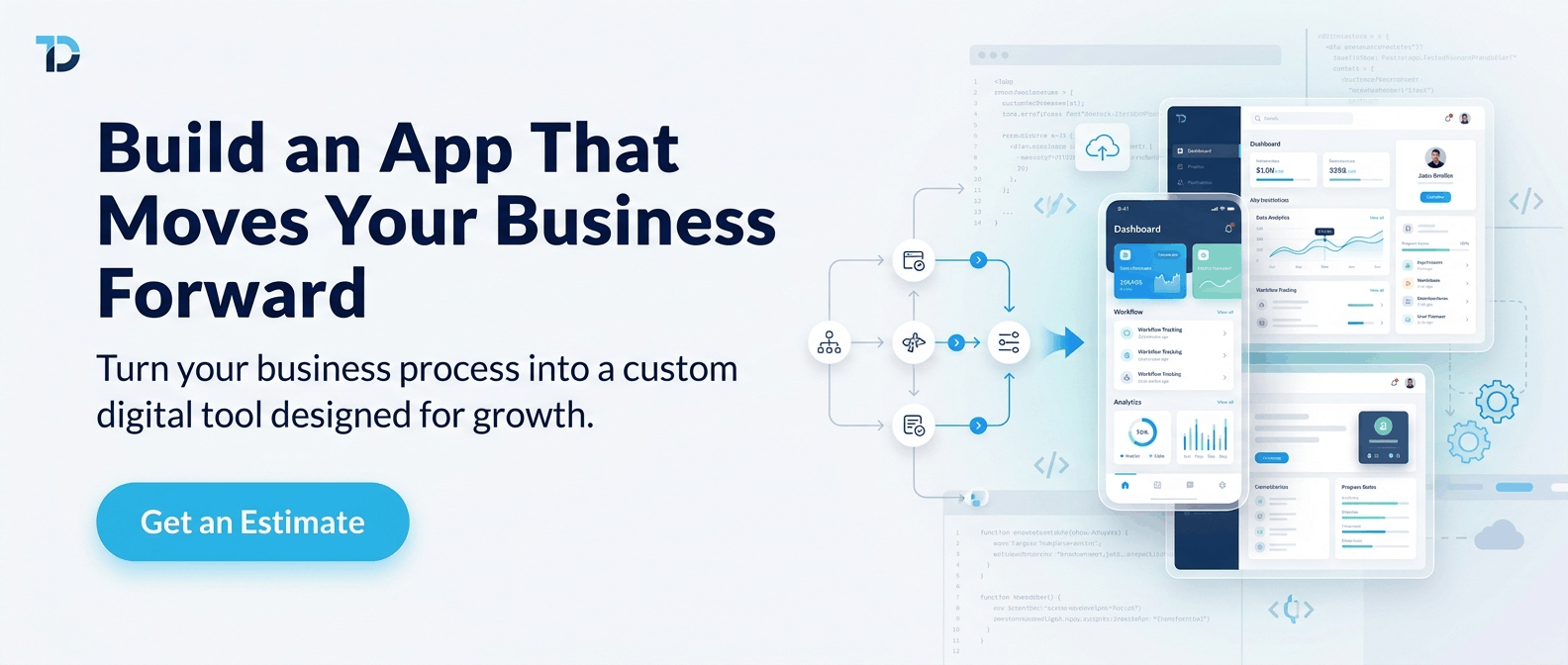
In practice, this means defining exactly what happens when a request is submitted: who receives it, in what order, under what conditions, and what happens if no action is taken within a set timeframe. The core components that separate a functional automated process from a basic notification system include:
- Triggers that initiate the workflow when a request is submitted.
- Routing rules that determine the path a request follows based on defined criteria.
- Automated notifications that keep approvers informed without manual chasing.
- Audit trails that record every action taken for accountability and compliance.
| Component | What It Does | Why It Matters |
|---|---|---|
| Triggers | Initiates the workflow when a request is submitted | Removes the need for manual handoffs to start the process |
| Routing rules | Directs the request to the right approver based on defined criteria | Ensures consistent handling regardless of who submitted the request |
| Automated notifications | Alerts approvers and submitters without manual follow-up | Reduces delays caused by missed emails or forgotten tasks |
| Audit trails | Records every action, decision, and timestamp | Supports compliance and provides a clear accountability record |
Gartner projects that 69% of repetitive tasks currently performed by managers will be automated, signalling how central this shift is becoming to everyday business operations. For scaling teams, this kind of structure transforms approval from an unpredictable dependency into a consistent, trackable step in a larger process.
Form Tools Versus True Workflow Systems
A form builder can collect information. A workflow system can act on it. This distinction matters more than most business owners realise when they first start exploring options.
Lightweight tools like simple intake forms or shared request sheets are useful for capturing data, but they do not route it, escalate it, enforce conditions, or track outcomes. They put the coordination burden back on a person, which means you have digitised the request without actually automating the process. A purpose-built workflow system reflects how your business actually operates: who approves what, when exceptions apply, and what a complete record of each decision looks like after the fact.
| Capability | Form Tool | Workflow System |
|---|---|---|
| Collect request information | Yes | Yes |
| Route requests to approvers automatically | No | Yes |
| Apply conditional routing rules | No | Yes |
| Send automated reminders and escalations | No | Yes |
| Maintain an audit trail of decisions | No | Yes |
| Track request status in real time | No | Yes |
How to Map Your Approval Process Before You Build Anything
The most common mistake in any automation project is building before understanding. If the existing approval process is inconsistent or poorly defined, moving forward without first mapping it will simply produce a faster version of the same problem.
Mapping involves documenting every step of the current process as it actually happens, not as it was intended to work. This means identifying every decision point, every person involved, and every place where requests regularly stall or get lost.
Mapping reveals patterns that are invisible when you are inside the process. A purchase approval that should take two hours might routinely take three days because one approver is always the last to be notified, or because requests requiring secondary sign-off have no defined route for reaching the second approver. According to Deloitte, approximately 32% of organisations identify scalability as a significant barrier to managing operations as they grow, and unclear approval processes are one of the most common contributors. Getting this on paper first means the digital approval process you build mirrors real business logic rather than introducing new confusion.
Questions to Answer Before Choosing Your Approach
Before scoping any solution, answer these questions clearly. They will shape both the complexity and the cost of what you build:
- How many approvers are typically involved in a single request, and do they ever need to act in parallel rather than in sequence?
- Are there conditional routing needs? For example, requests above a certain value requiring a second sign-off?
- Which existing tools does the approval process need to connect with, such as your accounting software, project management platform, or HR system?
- How many approval requests does the team process in a typical week, and is that volume expected to grow significantly?

Where a Digital Approval Process Delivers the Most Value
Not every approval process is equally worth automating first. The clearest return tends to come from processes that are high-volume, time-sensitive, and currently handled through email or manual follow-up. Strong candidates include purchase approvals and expense submissions, HR requests such as leave applications and reimbursements, client sign-offs on deliverables, and project gate reviews or internal sign-off milestones.
These are workflows where delays have a direct downstream effect on operations, vendor relationships, or client satisfaction. A manager approval workflow becomes significantly more consistent and auditable when routing rules are built into the system rather than assumed. McKinsey reports that 66% of organisations have already automated at least one business function, up from 57% the previous year, reflecting how quickly this has moved from an advanced capability to a standard operational expectation. When the rules are clear and the process is documented, managers spend less time chasing context and more time making informed decisions.
Where Human Oversight Still Belongs in an Automated Process
Automation does not work equally well across every type of decision. For routine, repetitive, and well-defined requests, automated approval steps remove friction without removing accountability. For high-stakes decisions, exceptions requiring contextual judgment, or processes that are still evolving, removing human oversight too early creates a different kind of risk. IBM research indicates that human error accounts for 23% of data breaches, and while automation reduces certain error types, it can also embed flawed logic at scale if the underlying rules are not reviewed carefully.
The right approach is not to automate everything, but to automate what is consistent and preserve human review at the moments that genuinely require it. In practice, this might mean building an escalation path for requests above a defined threshold, flagging unusual patterns for manual review, or keeping final sign-off authority with a specific person even when routing is fully automated. Thoughtful design here protects both compliance and accountability without defeating the efficiency gains the system is meant to deliver.

How a Custom-Built System Fits the Way You Already Work
Off-the-shelf approval tools carry a trade-off that many business owners only discover after committing to them. They are built for a generalised version of how businesses operate, which means the tool often dictates the process rather than reflecting it. Teams end up adapting their workflows to match the software’s constraints, introducing workarounds that the software can handle even when those steps do not reflect how the business actually makes decisions.
This is where a purpose-built system changes the dynamic entirely. At Twelfth Dream, the approach begins with understanding the business logic first. Only the features a business actually needs are built, which reduces waste and keeps the system focused. Delivery happens incrementally so clients stay informed and can shape the product as it takes form, rather than reviewing a completed build at the end. For workflow automation ideas for small teams that are ready to grow, this kind of scoped, adaptive approach means the system fits the team from day one and can evolve as the business does. Long-term support after launch ensures the system continues to serve the business rather than requiring a replacement cycle every few years.
A Realistic Starting Point for Vancouver Business Owners
The most practical first step is also the most focused one. Rather than attempting to automate every approval process at once, identify the single workflow that causes the most friction today. This is typically the one your team mentions most often, the one that generates the most follow-up emails, or the one where delays have a visible impact on something the business cares about.
Document that process in plain language: who submits the request, who approves it and in what order, what conditions or exceptions apply, and what happens when something gets stuck. From there, the scoping conversation becomes concrete rather than abstract.
Automating admin tasks in business is most effective when it starts with a defined, manageable process and expands from a proven foundation. A structured build does not require you to manage technical decisions or understand the underlying architecture. What it does require is clarity about how the current process works and what a successful outcome looks like. Starting focused keeps the first phase achievable and gives your team something real to work with before the scope expands.
If your team is spending more time managing approvals than acting on them, that is a signal worth taking seriously. Twelfth Dream works with business owners across Vancouver and the surrounding Lower Mainland to design and build approval systems that reflect exactly how their businesses operate, without the jargon or the overhead of managing a development process. Reach out to start a conversation about what your first automated workflow could look like.
Frequently Asked Questions About Automating Approval Workflows
What is approval workflow automation?
Approval workflow automation replaces manual coordination, such as email chains and verbal sign-offs, with a structured digital system that routes requests to the right people automatically, sends notifications, enforces rules, and records every action taken. The goal is to remove the administrative burden from staff while maintaining full accountability and auditability.
How do I know if my business is ready to automate approval workflows?
If your team regularly experiences delayed decisions, missed requests, or unclear accountability around approvals, you are likely ready. The clearest signal is when the volume of approval requests has grown beyond what informal systems can handle reliably. Businesses with ten or more staff and recurring approval processes are strong candidates.
What types of approvals are best suited for automation?
High-volume, time-sensitive processes with consistent rules tend to deliver the best results. Common examples include purchase and expense approvals, leave requests, client sign-offs on deliverables, and internal project milestones. Processes that follow predictable patterns and have clearly defined approvers are the easiest to automate effectively.
What is the difference between an email-based process and a workflow system?
Email-based approvals rely on individuals to forward, follow up, and track outcomes manually. A workflow system automates routing, sends reminders, escalates unanswered requests, and records every decision automatically. The result is a consistent, auditable process that does not depend on any single person remembering to act.
Does automating approvals remove decision-making from managers?
No. Automation handles the coordination, including routing, notifications, and record-keeping, while managers retain full decision-making authority. Well-designed systems make it easier for managers to act quickly because requests arrive with the right context already attached.
How long does it take to implement an automated approval workflow?
Timeline depends on the complexity of the process and how well it is documented before the build begins. A focused, single-process automation can move quickly when the business logic is clearly defined. More complex systems with multiple integrations and conditional routing naturally take longer. Starting with one well-scoped workflow is the most reliable path forward.